
SportsNow fully supports Tariff 595 for health insurance providers. Reimbursement claims can therefore be created and sent directly in SportsNow, without the need for additional software or external fees. The implementation includes the XML 5.0 invoice standard as well as the complete tariff logic, including the management of tariff codes. This means that you can manage the entire process directly in SportsNow as usual. In this FAQ, you will find answers to frequently asked questions about Tariff 595.
- You can find Step-by-step instructions for the setup here: Tariff 595 – Swiss Health Insurance
- For the correct setup of your passes in connection with Tarif 595, we also recommend consulting the official guidelines and FAQ: Information for Health Promotion Professionals (VVG)
What information needs to be completed for the reimbursement claim?
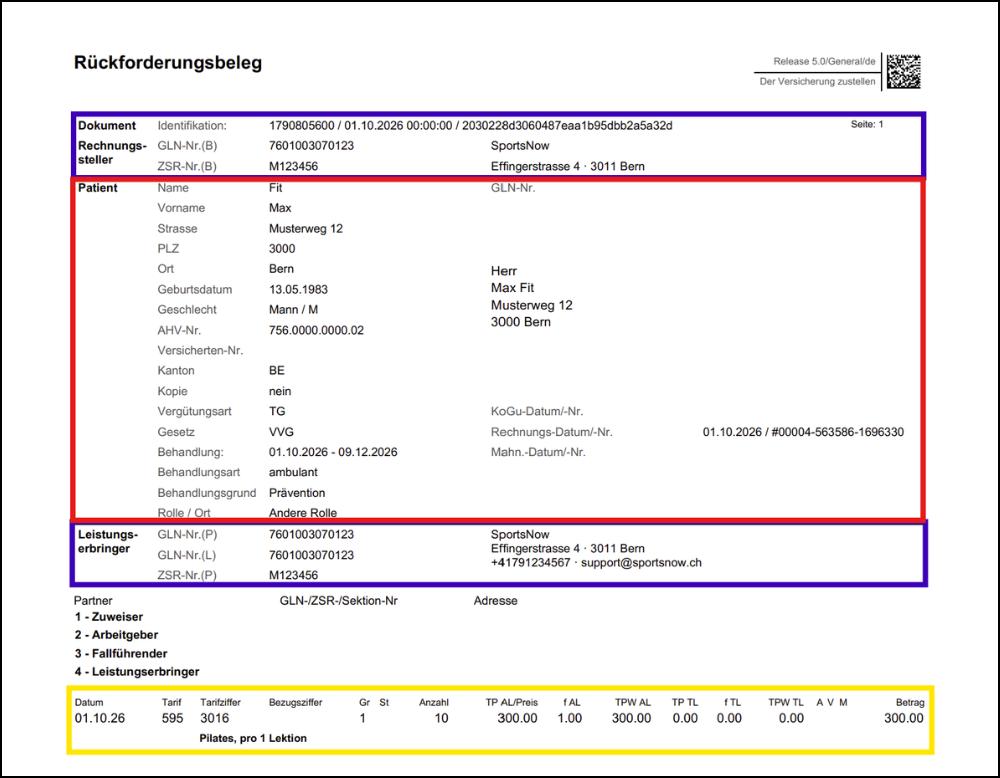
To ensure that you are fully compliant with Tariff 595 and that your reimbursement claims contain all information required by the health insurance provider, make sure that the information listed below is completed correctly.
- Information about the invoice issuer/service provider (in blue): This section contains the information about your studio.
- GLN number: This is the Global Location Number. This field can currently be left blank but will become mandatory from 2027. According to the official guidelines, the certification bodies will ensure that everyone receives a GLN number by the end of the year. As soon as you have received your number, you can enter it in the SportsNow admin area under «Apps & Integrations» – «Tariff 595».
- ZSR number: This is the number from the Swiss Register of Payment Recipients (Zahlstellenregister). The ZSR number must be entered in SportsNow when setting up Tariff 595 under «Apps & Integrations» – «Tariff 595».
- Address, email and telephone number: These are the details of your studio that are stored in your admin area under «Set up my studio» – «My studio profile».
- Information in the «Patient» section (in red): This section contains all relevant information about your member.
- Personal information of the member: The member’s last name, first name, address, date of birth, gender and AHV number must be completed. You can edit your members’ personal information directly in the customer details in your admin area. Your members can also complete the information themselves in their account. When they book a class, the information is automatically transferred to your studio.
- Insured person number: This field refers to the insurance card number, which your members can find on their insurance card. This field must also be completed.
- All other information in the «Patient» section is completed automatically by the system.
- Information about the service provided (in yellow): This section contains all relevant information about your member’s pass.
- To ensure that the information is complete, the appropriate tariff code, quantity and number of lines must be specified for each pass. You can configure these settings directly in SportsNow under «Apps & Integrations» – «Tariff 595».
- The validity period and price of the pass are taken directly from the member’s pass details.
How can I enter members’ information and ensure that I receive all mandatory information?
As described above, the following information is mandatory for your members:
- First and last name
- Address
- Date of birth
- Gender
- AHV number
You can enter this information directly in the member’s personal information. You can find instructions here: Edit personal information of members
Your members can also enter their personal information directly in their own account. We recommend marking the mandatory information mentioned above as required fields in SportsNow. This ensures that your members have completed all the required information. You can find instructions on how to set up required fields here: Configure customer fields. Please note that if a member completes their information directly in their account, the data will not be transferred to your studio immediately, but only when the next relevant action takes place (e.g. booking, purchasing a pass, issuing an invoice, check-in, etc.).
How is the reimbursement claim created and sent to the member?
The reimbursement claim is created automatically and sent to your members. Your members can download the reimbursement claim directly from the email. Under «Apps & Integrations» – «Tariff 595», you can specify when the reimbursement claim should be sent. The following options are available:
- After payment has been received (with payment confirmation): The reimbursement claim is sent together with the payment confirmation only after payment has been received.
- With the invoice: The reimbursement claim is sent directly together with the invoice.
Both options are valid, so you can decide which option best suits your studio’s process.
Where can the reimbursement claim be viewed, sent or printed again?
By default, your members can print the reimbursement claim directly from the email. Alternatively, they can download the reimbursement claim from their SportsNow account. Your members can find instructions here: Download reimbursement claim
If you would like to download the reimbursement claim again or send it to your members, you can do this directly in the admin area under «My finances». For the relevant member’s invoice, press «Action» – «Download reimbursement claim» or «Send reimbursement claim».
What happens if customer/insurance information or pass details are changed afterwards?
If your members’ information changes or the reimbursement claim is incomplete, you can add or update the information directly in the customer details. You can find instructions here: Edit personal information of members
As soon as you have changed or added the personal information or pass details, the reimbursement claim is automatically updated in the admin area and you can send it to the member again.
If a member actively uses SportsNow and changes their personal information in their own account, the information is synchronized with the studio during the next relevant action, such as a booking, pass purchase, invoice creation or check-in. As soon as the information has been synchronized, the reimbursement claim can be downloaded again with the updated information.
How do I assign the tariff code to each pass?
Each pass must be assigned a tariff code, quantity and number of lines. In the admin area under «Apps & Integrations» – «Tariff 595», you will see all passes from your pass settings. For each pass that you want to invoice according to Tariff 595, you must enter the following information:
- Tariff code: Here you can select the service from the list that best matches your offer. For each tariff code, you can specify whether it is invoiced monthly or according to the number of classes.
Example: For a 10-class Pilates pass, you can select tariff code «3016 Pilates, per 1 lesson». For an annual Pilates pass, select tariff code «3015 Pilates, per 1 month». To quickly find the appropriate tariff code, press the field and enter the code. The selection will then jump directly to the corresponding entry. - Quantity: Enter either the number of months or the number of credits included in the pass.
Example: The 10-class Pilates pass mentioned above is invoiced according to the number of classes, so you can enter «10» as the quantity (defined credit). For the annual Pilates pass, billing is based on months, so you can enter «12» as the quantity (number of months for which the pass is valid). - Line(s): Enter the number of lines that should be created. As a standard setting, you can always enter «1». Only for multi-year passes should the number of lines be increased.
- Description: If the tariff code for your pass is «9999, services that do not correspond to a tariff code», an additional description of the service is required.
Can I continue to use the standard SportsNow invoice, or do I have to use the patient invoice?
In general, you can continue to use the SportsNow invoice. The patient invoice according to Tariff 595 is only required if the invoice needs to be submitted to the insurance provider. The reimbursement claim is created regardless of the selected invoice format. In the admin area under «Apps & Integrations» – «Tariff 595», you can select your preferred format under «Invoice format» (SportsNow invoice or patient invoice according to Tariff 595).
Can the studio send the reimbursement claim directly to the health insurance provider (eTG)?
Electronic Tiers Garant (eTG) is the digital transmission of the reimbursement claim directly from the service provider, meaning your studio, to the health insurance provider. As the health insurance providers’ interface is not yet available, it is currently not possible for the studio to send the reimbursement claims directly to the health insurance provider. However, this feature is planned for the medium term. For Tariff 595, members therefore currently still need to send the invoice and reimbursement claim directly to their health insurance provider. Your members receive the reimbursement claim by email and can download the documents directly as a PDF. As soon as the insurance providers make the interface available and studios can send the documents directly to the health insurance provider, we will inform you in our Update News: Update News
Is it possible to use individual ZSR and GLN numbers?
It is currently not possible to use individual ZSR and GLN numbers. This means that the two numbers cannot currently be defined individually for each instructor/team member and can only be defined per studio. However, the feature for individual ZSR and GLN numbers is already planned and will be implemented in the coming months. We will inform you in our Update News as soon as the feature becomes available: Update News
I use the bexio integration. What do I need to consider in connection with Tarif 595?
If you use bexio for invoicing, you can generally continue working as usual. However, please note the following:
- The reimbursement claim for health insurance providers is created directly via SportsNow independently of bexio and complies with Tariff 595.
- Invoices from bexio do not currently comply with the XML 5.0 standard. In general, you can still continue to use the bexio invoice. The patient invoice according to Tarif 595 is only required if the invoice needs to be submitted to the insurance provider. The reimbursement claim is created regardless of the selected invoice format.
- If you want to work in full compliance with Tarif 595, you can send your invoices directly via SportsNow in the future. bexio can still be used for accounting without any issues.